Meeting Owl 360 Degree Video Conference Camera with Automatic Speaker Focus
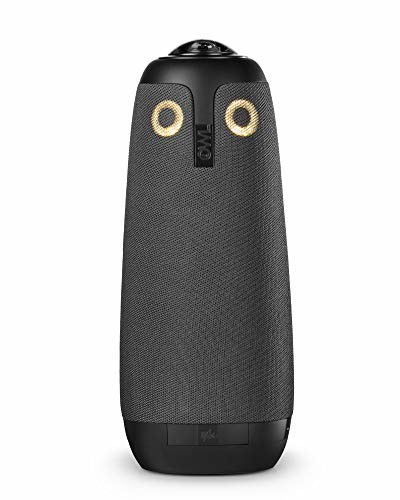
No other conferencing camera puts everyone “in the room.” Take a transformational approach to your remote and distributed meetings. The Meeting Owl gives a more inclusive video conferencing experience. That means increased efficiency, no miscommunication, and a team that feels closer together. Product Features BEST TEAM MEETING EXPERIENCE. Meeting Owl is the first 360° smart
No other conferencing camera puts everyone “in the room.” Take a transformational approach to your remote and distributed meetings. The Meeting Owl gives a more inclusive video conferencing experience. That means increased efficiency, no miscommunication, and a team that feels closer together.
Product Features
- BEST TEAM MEETING EXPERIENCE. Meeting Owl is the first 360° smart video conferencing camera. It automatically highlights and shifts focus to different people in the room when they speak, so you know what’s happening as if you’re there.
- SEE AND HEAR EVERYONE CLEARLY. It combines mic, camera and speaker into one device and sits in the center of the table. The 360° lens shows the whole room, while eight microphones pick up everyone within twelve feet.
- EASY AND QUICK SETUP. Plug in the power and USB, load up your favorite video conferencing platform, and start your meeting. No downloads or installs.
- GET NEW FEATURES AUTOMATICALLY. Meeting Owl connects to wifi so you get new helpful features automatically over time and the best possible experience.
- GIVE THE OWL A TRY. Use the 30-day return policy to try the Meeting Owl in your own office. Get feedback from your in-office and remote teammates and see what they think.















)
When Corporate IT comes… a big company perspective I work for a company with about 26K employees, where infrastructure is pretty locked down but we realize that “digital is coming” and that we have to be more flexible. My review is really for the corporate IT department trying to figure out what the heck this thing is, is it a security risk, and where do we go from here.First, we wanted to know that this can be used in fully stand alone mode– USB only– as a webcam. It can. Internet is not absolutely required, it does work with Pixelbook and Chromebooks, it does work with Windows 10 with no additional manual driver loads required.IT does do what it claims, scanning the room, identifying humans, making them the center of the video when they are speaking as you would expect from a very large, very expensive video conferencing system. The video quality was “good” but I wouldn’t call it exceptional.Next: Firmware updates. Yes it does require some kind of wifi based internet connection…
Meeting Owl – Good first attempt – Still needs refinement I bought the MO after having articles forwarded to me from (2) different people in the same day about it and then gettting inundated with social media ads… so good news for the Meeting Owl marketing team, your marketing worked.We do morning “Huddles” where we have approximately 20 people in one room and a few other people remotely video conferencing in. We use mainly Chrome OS with Zoom running in a web browser. Our normal setup is a wide view camera on the top of a TV at one end of the room. The room is fairly large, approximately 25-30 feet long and 15 feet wide.We tested it with a huddle this morning and overall it worked well — some takeaways so far:* It definitely has a “cool” factor — people found themselves staring at the screen to see if it noticed they were speaking… we dubbed it “Witchcraft” :)* The speed at which is detects who is speaking can vary — sometimes it picks them up right away,…