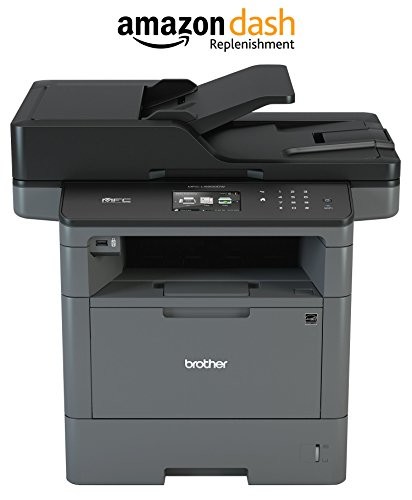
Brother Monochrome Laser Printer, Multifunction Printer, All-in-One Printer, MFC-L5900DW, Wireless Networking, Mobile Printing & Scanning, Duplex Print, Copy & Scan, Amazon Dash Replenishment Enabled
Perfectly designed for busy office and small workgroups looking for reliable performance and cost-effective output, the Brother MFC-L5900DW Monochrome Laser All-in-One is the go-to solution you’ve been looking for. Fast print and copy speed of up to 42ppm will help increase your productivity, and the cost-efficient output, thanks to the high-yield replacement toner cartridge, will
Perfectly designed for busy office and small workgroups looking for reliable performance and cost-effective output, the Brother MFC-L5900DW Monochrome Laser All-in-One is the go-to solution you’ve been looking for. Fast print and copy speed of up to 42ppm will help increase your productivity, and the cost-efficient output, thanks to the high-yield replacement toner cartridge, will help lower your operating costs. The MFC-L5900DW also offers flexible paper handling, with a 300-sheet paper capacity. This all-in-one can be expanded to a 1,340 sheet-capacity with optional trays (LT-5500, LT-6500). A 70-page capacity automatic document feeder allows you to complete large-volume scanning and copying projects while you focus on other tasks. This system also offers two-sided printing, letting you save money on paper and resources.
The MFCL5900DW offers built-in wireless and Ethernet interfaces and mobile device printing and scanning via AirPrint, Google Cloud Print 2.0, Brother iPrint&Scan, and Wi-Fi Direct(2). The 3.7-inch touchscreen allows you to scan and print from popular business cloud services, including Dropbox, Evernote, Google Drive, and more(1). This Brother monochrome laser multifunction printer offers advanced security features to keep your documents, network and devices secure.
The Brother MFC-L5900DW Business Laser All-in-One is also Amazon Dash Replenishment enabled, which means that you never have to run out of toner when you activate this automatic fulfillment system. This Brother all-in-one is backed by a one-year limited warranty and free at-your-side support for the life of your product, featuring online, phone, or live chat assistance.
(1)Requires an Internet connection and an account with desired service. (2)Requires connection to a wireless network.
Product Features
- Upon activation, the Amazon Dash Replenishment service measures the toner level and automatically orders toner from Amazon when low. This ensures that you never run out again
- Fast, high-quality printing & copying up to 42ppm. Easily share with others via built-in Wireless or Gigabit Ethernet networking
- Unit Dimensions (WxDxH):19.5 x 16.8 x 19.1(inches) .300-sheet paper capacity, expandable to 1,340 sheets with optional add-on trays (LT-6500 or LT-5500)
- 70-page capacity duplex auto document feeder scans both sides of the page in a single-pass for fast, two-sided scanning and copying. Cost efficient printing with high-yield replacement toner cartridge
- Print from/scan to business cloud services with 3.7″ Color Touchscreen display. Size : 24.50 x 23.00 x 20.50″
- Class 1 Laser Product, power output is enclosed;
Memory Transmission: Up to 500 pages














)
Glare on color LCD screen and unplugging machine after each install may be a deal breaker I bought this printer as a replacement for the Brother MFC8910DW which was very good when it worked, but was prone to errors including broken drums and drum error message. I got the MFCL5900DW printer to give Brother another shot.Speed:Initial start up time to first printed state feels like about 2 seconds slower on the MFCL5900DW compared to the older MFC8910DW. Once it starts printing, the speed on the MFCL5900DW is very fast.Installation:I installed the…
Amazing! I Recommend No Other Brand! Converted! I’ve owned exclusively high-dollar color laser HP and Lexmark printers. All of them have been unnecessarily expensive to maintain and they all had their own quirks. I’ve had this printer for over a year and I am VERY impressed. No quirks, very economical toner and you get this odd feeling that every part of this MFP has been well thought out.Honestly, I never use the touch screen but it works great. I do most of the controls from the computer.Scanner is spot on with…
“Replace toner” Loved the printer until it decided to tell me I HAD to change the toner. The few brother printers I’ve had before had simple overrides but Brother seems to have worked a little harder on this one and I can’t figure out how to print checks at my office despite the fact that the printer was printing flawlessly before the shut down.If you’re legally blind and aren’t able to tell when your copies look like garbage then this printer is for you. Brother will tell you (prematurely) that…