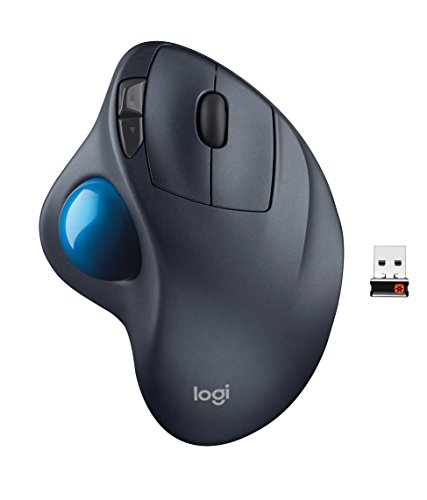
Logitech M570 Wireless Trackball Mouse – Ergonomic Design with Sculpted Right-hand Shape, Compatible with Apple Mac and Microsoft Windows Computers, USB Unifying Receiver, Dark Gray
The logitech wireless trackball m570 gives you a different kind of comfort. it stays in one place and supports your hand to let you work all day with ease. System Requirements: Windows Vista Windows 7 Windows 8 or Windows 10|USB port Internet connection for software download|Mac OS X 10.5 or later|USB port|Internet connection for software
The logitech wireless trackball m570 gives you a different kind of comfort. it stays in one place and supports your hand to let you work all day with ease. System Requirements: Windows Vista Windows 7 Windows 8 or Windows 10|USB port Internet connection for software download|Mac OS X 10.5 or later|USB port|Internet connection for software download
Product Features
- TRACKBALL COMFORT Sculpted shape supports your hand and stays in one place-move the cursor without moving your arm
- CONVENIENT CONTROLS Easy to reach Back/Forward buttons makes moving quickly between documents or browsing your favorite Web sites a breeze
- LONG BATTERY LIFE With up to 18 months of use from a single AA battery, you might just forget your trackball uses batteries at all
- EASY TO CLEAN Should you need to clean your trackball, removing the ball is a snap
- PLUG’N’PLAY CONNECTION Nano sized Logitech wireless unifying receiver stays in your computer- plug it in, forget it, even add compatible wireless devices without multiple USB receivers.Wireless operating distance: Approx 10m


















)
Breaks I have about 5 of these. I have 5 because i have multiple computers BUT ALSO BECAUSE THESE DO NOT LAST. I LOVE it & how it works. I have NOT experienced some of the problems some other reviews talk about. I work a LOT using this (& the others) mice so I give it a good work out. One particular button on ALL OF THEM gives out. The inside spring gets loose (I guess). It will work but I have to press extra hard. Usually it will not hold for a copy good. I started to take the unit apart to find the spring to see if I could tighten it. The unit is not made to be taken apart of repaired. I phoned Logitech & they verified this. SO for me, it lasts 1-2 years & Then I Must buy another. Pretty sad for a major company like Logitech. Today I TRIED to communicate with Logitech to see if they had improved this model. Their “chat” sessions never opened (I waited 15 minutes). I tried to communicate by phone. They offered a phone number to call. That number referred me to a different number…
Trackball problem solved–and an easy way to turn this into a vertical mouse! This is my second M570. With my first, I encountered some of the glitchy problems with the ball tracking noted in other reviews and I used the solution of transferring the ball from my old wired version. But this most recent trackball seems to have solved that problem. The ball scans and tracks perfectly, even if I forget to clean the contacts and dirt builds up. The convenience of the forward-back buttons is outstanding.I also stumbled onto a solution to even further enhance its ergonomic features and minimize any discomfort from long sessions at the computer. I used a to convert it into a vertical trackball! I’ve seen other home-built conversions but this one is so simple, elegant, and effective that it can’t be beat. Combine it with a pad like the and you’re in…
With a little help it is a GREAT solution for carpal tunnel and wrist pain It’s a good option for people with carpal tunnel such as myself and looking for a more ergonomic option. If it had a better angle out-of-the-box I’d give it 5 stars, however with a little propping it can be perfect, see below. Tips:1. To make it 10x more ergonomic, place a wedge with a 30 degree incline under it to make it the most natural wrist angle and keep you from resting any weight on the nerves in your wrist. Experiment with different angles to find the best for you personally. I trimmed a chunk of stiff foam from some laptop packaging material, see the attached photos. This has been a HUGE benefit for my wrists and in combination with other ergonomic tweaks to my setup and regular stretching and soft tissue work has left me pain-free for some time now.2. You’ll need to clean the dust and lint from the rollers and optical sensor under the ball once a week, it takes seconds but will keep the trackball nice and responsive.