Logitech MX Master Wireless Mouse – High-Precision Sensor, Speed-Adaptive Scroll Wheel, Easy-Switch up to 3 Devices – Meteorite
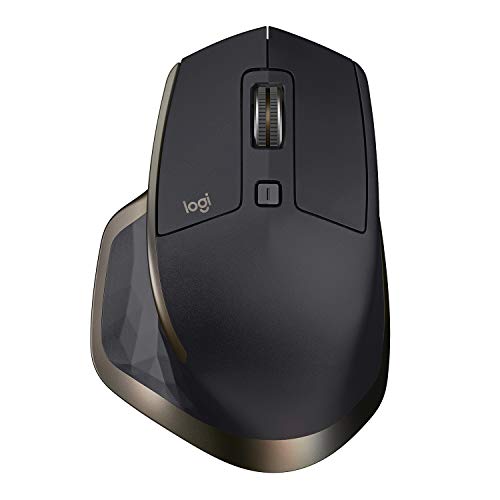
Logitech MX master wireless mouse is the flagship mouse from Logitech designed for real power users. This high-end mouse offers comfortable hand-sculpted contour, advanced features, stunning design, and is optimized for Windows and Mac. MX master is equipped with a Smart speed-adaptive scroll wheel, a unique thumbwheel for side-to-side scrolling and more, dark field sensor
Logitech MX master wireless mouse is the flagship mouse from Logitech designed for real power users. This high-end mouse offers comfortable hand-sculpted contour, advanced features, stunning design, and is optimized for Windows and Mac. MX master is equipped with a Smart speed-adaptive scroll wheel, a unique thumbwheel for side-to-side scrolling and more, dark field sensor for flawless tracking, and a rechargeable battery with up to 40 days battery life. MX master can be connected via included Logitech unifying receiver or via Bluetooth low energy wireless technology. Pair up to 3 devices and easily switch between them with just one touch of a button. Install Logitech options software to experience a full range of possibilities of this performance mouse and customize buttons and actions to your needs
Product Features
- Unique thumb wheel: for horizontal navigation and advanced gestures
- Easy connections for multiple computers: use with up to three Windows or Mac computers via included Unifying receiver or Bluetooth smart wireless technology
- Easy switching between computers with the touch of the button
- Tracks virtually anywhere – even on glass: the dark field sensor tracks flawlessly even on glass and high-gloss surfaces (4mm minimum thickness)
- Advanced power management: up to 40 days of power on single charge. You can get enough power for a full day of usage in only 4 minutes, with No downtime while recharging


















)
Not a fan of this mouse. Upgraded from a very old Performance MX mouse that started having issues, and I’m very disappointed with my experience so far with this mouse in Windows 10.Ergonomically this mouse was not designed for my hand. The palm/knuckle section of the mouse sits very high, and feels awkward. The back/forward buttons are placed in a very awkward position that almost requires me to move my hand to get at them, I can’t just roll my thumb over them anymore.The worst issue I’ve been running into is with the “logitech options” software and it’s pointer speed settings. Even at the highest speed the mouse is VERY slow. The only workaround I’ve found for this is to shut off the logitech software in task manager and set the mouse speed in “mouse properties” in the windows control panel (if you do not shut off the logitech software it will overwrite your settings). If you opt to shut off the Logitech software it will disable functionality like the middle button click, back/forward…
Major design flaws Good news is I was able to replace this mouse with the Logitech M720 Triathlon.I work with 2 laptops and 3 screens. Bought this mouse and the K850 keyboard to quickly switch between laptops/screens. Ran into some design issues with this mouse:1. The button to switch laptops is on the bottom of the mouse so you can’t quickly switch on the fly. You have to turn the mouse over and press the button with other hand every time you want to swap devices. Other Logitech Flow mice such as the M720 Triathlon have the button on the top within easy reach.2. This is a big mouse (palm design) and pretty heavy. I prefer a smaller mouse that’s also better for travel. The M720 Triathlon is smaller and lighter.3. Laser didn’t respond well to my hard mouse pad4. The gesture button is nearly impossible to press. It was so hard that I didn’t even know it was there. Trying to program commands with this button was futile.What I liked…