Logitech Conference Cam BCC950 Video Conference Webcam, HD 1080p Camera with Built-In Speakerphone
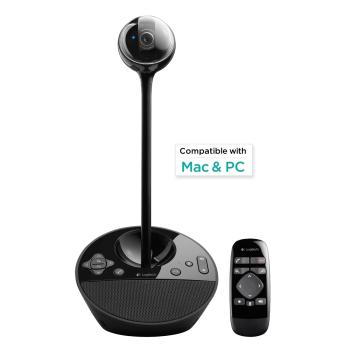
The first all-in-one video and audio conferencing system for small groupsView larger Logitech ConferenceCam BCC950 Small group video conferencing has arrived everywhere. Now you can instantly transform any office or meeting space into a business-grade small group video conference room. Logitech’s ConferenceCam BCC950 is the first all-in-one video and audio conferencing device designed with small
 The first all-in-one video and audio conferencing system for small groups
View larger Logitech ConferenceCam BCC950
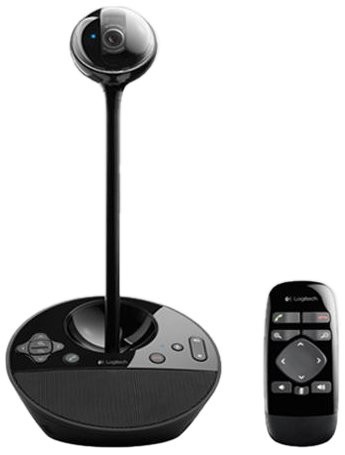
Small group video conferencing has arrived everywhere. Now you can instantly transform any office or meeting space into a business-grade small group video conference room. Logitech’s ConferenceCam BCC950 is the first all-in-one video and audio conferencing device designed with small groups in mind. It combines a freestanding wide-view HD webcam with an enterprise-quality speakerphone in one easy-to-use, computer-connected device. Small groups can run their own video conferences anywhere in the office, without huddling around PC webcams or competing for time on overbooked conference room systems.
Setting the Standard
The award-winning ConferenceCam BCC950 is making high-quality group video conferencing more affordable and accessible to businesses of all sizes.
 Business-grade HD video
Experience desktop video meetings so clear and razor sharp, you’ll feel like you’re face-to-face in the same room. With 1080p HD video at a smooth 30 frames per second, precision autofocus, a premium Carl Zeiss lens, and advanced auto light correction, everyone in the room can be clearly seen in professional high-quality video—even in low light or backlit conditions.
 View larger Professional Speakerphone
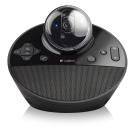
The built-in full duplex speakerphone&mndash;and integrated omni-directional microphone with both noise and echo cancellation—allow everyone in the group to hear and be heard clearly up to eight feet away from the ConferenceCam.
 A wider field of view, perfect for group meetings
View larger Full-room View
A 78-degree field of view and 180-degree video pan ensure that each member of the small group is seen in your meetings. You have far more freedom to move around the room, interact together, and show presentation materials than you would with the limited field of view of built-in computer webcams.
 Pan, tilt, zoom, and control audio with included remote
View larger Versatile Voice & Video Control
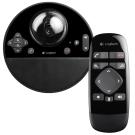
With the included remote control and console buttons, you can instantly pan, tilt and zoom the camera to focus on the entire team, the meeting leader, or detailed close-ups of whiteboards, documents, design layouts, and product demonstrations. Easy controls for answer/end calls, volume up/down and mute are all at your fingertips.
 Plug-and-Play Simplicity
Unlike operating highly technical conferencing systems, the Logitech ConferenceCam is so intuitive that anyone in the office can easily setup and control video meetings. There’s no software to install. Simply plug the USB cable into a PC or Mac and start the meeting using virtually any video conferencing platform.
App-friendly Compatibility
You can immediately deploy small group video conferencing without a proprietary and expensive system to set up. ConferenceCam BCC950 works on virtually any desktop video conferencing and Unified Communications application.
Product Features
- Features professional HD video with superior speakerphone audio for simple, small-group conferencing
- Carl Zeiss Optics with Autofocus deliver razor-sharp images and allow detailed visuals to be shared close-up . Microphone Bandwidth: 200 Hz – 8 kHz. 720p HD video calling (up to 1280 x 720 pixels). COMPATIBILITY AND INTEGRATIONS Plug-and-play USB connectivity Works with most any video conferencing application or meetings service, including Skype for Business, BlueJeans, Broadsoft, Cisco Jabber, Cisco WebEx, Fuze, LifeSize Cloud, Vidyo, and Zoom
- 78-degree field of view and 180-degree remote-controlled video pan, tilt, zoom ensure whole group visibility
- All-in-one design combines HD video with high-quality audio clarity
- The built-in, full duplex speakerphone and noise-cancelling microphone. Allows all meeting members to hear and be heard clearly up to 8 feet away from the base.
- Omni-directional mic pickup and echo cancellation audio. Makes it seem like conversations are happening in the same room.
- Remote control and base button control options. Quickly control camera pan, tilt and zoom and volume up/down, mute and answer/hang-up functions during call.
- Broad application compatibility. Optimized for Microsoft Lync and Skype and works with most other popular UC platforms.
- All-in-one design combines HD video with high-quality audio clarity
- The built-in, full duplex speakerphone and noise-cancelling microphone. Allows all meeting members to hear and be heard clearly up to 8 feet away from the base.
- Omni-directional mic pickup and echo cancellation audio. Makes it seem like conversations are happening in the same room.
- Remote control and base button control options. Quickly control camera pan, tilt and zoom and volume up/down, mute and answer/hang-up functions during call.
- Broad application compatibility. Optimized for Microsoft Lync and Skype and works with most other popular UC platforms.















)
Good speaker, Good Quality Video… FOV could be better for “group” I’ve found myself quite enjoying this conference cam/speaker. Purchased through my company for home-office and group conferencing. I used to wear a headset and it’s quite a relief to be able to kick back, especially on long conference calls.Speaker Quality: The quality of the speakers is quite decent and can also be used as primary sound output. Much better than my laptop speaker. It’s also plenty loud for conference calls.Microphone: For the price-point, the microphone is pretty good. Noise cancellation is quite decent and audio quality on the receiving end is pretty great as well (others on my team use this as well).Video: Video quality is quite excellent. You have the option to use the camera “plugged” directly into the unit, which is a little more sleek than having it on the stand/extender to raise it up, but the downside is that you then have the camera looking up at you… many don’t find this angle flattering.Other:…
Saved us money over Cisco Telepresence I work in IT for an engineering company that relies heavily on conferencing for a lot of our business. However, we’ve run into several instances lately where we have been asked “Why don’t you guys have video?” Our answer has always been that we just can’t afford the telepresence systems we’d love to have. Now that Logitech has released this conference camera, we finally can afford it!Through testing we found many upsides, but also a few downsides. The video seems choppy sometimes, and it definitely can have exposure problems when the user is sitting near a bright light or window. However, the speakerphone and microphone has seemed extremely clear, and we’ve received good feedback from other conference attendees. I’ve organized a table below to reflect the pro’s and con’s.***PROS***-Price (compared to comparable products)-Features a remote (no more reaching for the camera to move it!!)-Speakerphone is loud & clear-Can be powered…
A perfect mid-level conference option for smaller teams If you frequently have to hop onto video conferences (or even audio conferences), this is a great solution between using your built-in laptop camera and a full-blown standalone conference unit at the price. There doesn’t seem to be many options at this price point and functionality.Pros:- Simple setup and works immediately.- Great camera – the height is perfect and the zoom and adjustable angle is a massive upgrade from laptop cameras- The standalone camera has many benefits versus having a device attached to your screen, including better for more than 1 person on a video con.- Mic quality is clear and very receptive- Speakers offer a great solution for a small boardroom- The little remote is a cool toy to adjust the camera without reaching for the unit during a conference (plus mute buttons)- Physical mute and call drop buttons on the device (versus trying to figure out on whatever conference software you’re on where to mute your…