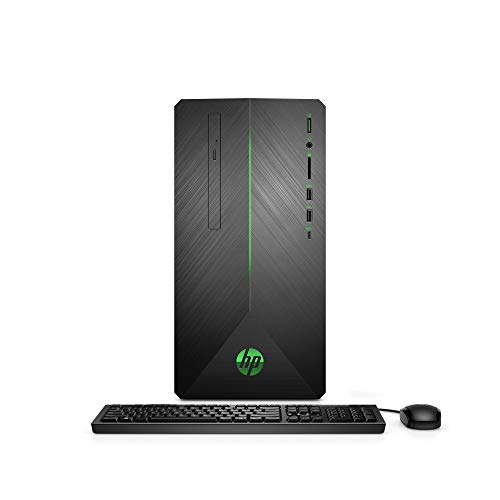
HP Pavilion Gaming PC Desktop Computer, Intel Core i5-9400F, NVIDIA GeForce GTX 1660Ti, 8GB RAM, 256GB SSD, Windows 10 (690-0073w, Black)
Packs serious power. Use wisely. The HP Pavilion Gaming Desktop is all about smooth performance and crisp graphics wrapped up in a bold design. This PC offers the latest technology plus the ability to upgrade, keeping performance up-to-date. Get ready to play in powerful style today and for years to come. Product Features HP Pavilion
Packs serious power. Use wisely. The HP Pavilion Gaming Desktop is all about smooth performance and crisp graphics wrapped up in a bold design. This PC offers the latest technology plus the ability to upgrade, keeping performance up-to-date. Get ready to play in powerful style today and for years to come.
Product Features
- HP Pavilion Gaming Desktop Tower NVIDIA GeForce GTX 1660Ti
- Intel Hexa (6) Core i5-9400F Processor (2.90 GHz – 4.10 GHz) | Windows 10 OS
- 8GB DDR4 SDRAM | 256GB SSD | DVD | Included Keyboard and Mouse
- VR Ready and HP Jumstart | WiFi 802.11ac and Bluetooth 4.2 | 5.1 Surround Sound Speaker
- Interfaces: 3-in-1 Media Card Reader | HDMI | DisplayPort | DVI-D | 4 x USB 2.0 | 4 x USB 3.1 | 1 x USB-C | Headphone/Microphone Combo

















', 'https%3A%2F%2Ftimelessexchange.com%2Felectronics%2Fhp-pavilion-gaming-pc-desktop-computer-intel-core-i5-9400f-nvidia-geforce-gtx-1660ti-8gb-ram-256gb-ssd-windows-10-690-0073w-black'))
Fill the empty M.2 slot on the motherboard with a NVMe SSD card! I went with the Corsair MP510 for my SSD, but there are plenty of other good options from which to choose. You definitely want to make the SSD your operating system’s primary boot drive, so keep that in mind when selecting the size of the SSD you will install… I went with half the size of the HDD that came with the machine, so 500 GB, which is probably about double what I reasonably need. While you’re fiddling around inside your new machine’s guts, you may as well go ahead and fill the…
Becomes a brick after applying Windows 10 update 1803 I purchased this PC and after applying update 1803 it refused to boot. It would show the HP logo and spinning circle of dots then go to a black screen (remained here for over 12 hours). A couple of times I was able to unplug and replug the PC and then it would boot, but it stopped doing that after a couple of reboots. It would boot into safe mode, but not normal mode and the only thing on the system was update 1803. I worked with HP to resolve the issue and they sent me two other identical…
Worked Once and Then Never Again The computer arrived with the shipping label on the wrong side of the package. After starting up, everything seemed to be going well. About two hours into usage, the HP icon pops up with a red exclamation saying that important updates were needed.Upon restarting (due to the update suggested by HP), the computer entered HP’s automatic repair mode on every restart. Turning it off, restarting, continuing to Windows, and even trying a full factory reset just relaunched HP repair…