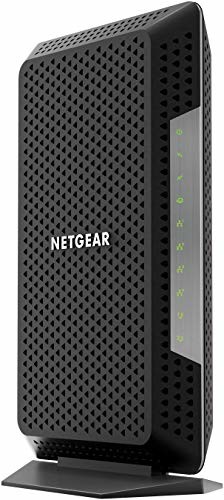
NETGEAR Nighthawk Multi-Gig Speed Cable Modem for Xfinity Internet & Voice. Docsis 3.1 Technology (CM1150V)
NETGEAR Nighthawk Multi-Gig speed Cable Modem for XFINITY Internet & voice delivers Gigabit speed Cable Internet and the best call clarity. This first-to-market DOCSIS 3.1 cable Modem with voice supports all of today’s Internet service plans and is designed for high-performance Internet in the future. It includes two telephone ports that automatically prioritize voice-over-internet for
NETGEAR Nighthawk Multi-Gig speed Cable Modem for XFINITY Internet & voice delivers Gigabit speed Cable Internet and the best call clarity. This first-to-market DOCSIS 3.1 cable Modem with voice supports all of today’s Internet service plans and is designed for high-performance Internet in the future. It includes two telephone ports that automatically prioritize voice-over-internet for clear and uninterrupted calls. It provides enhanced call features like 3-Way conference calling, caller ID, call forwarding and more. It includes Gigabit Ethernet ports (with LAN Port aggregation) for faster wired connections. It can save up to $120 per year on monthly cable modem rental fees.
Product Features
- Eliminate monthly cable Modem rental fees – approximately $156/Year savings
- Docsis 3.1 is 10x faster than DOCSIS 3.0- great for streaming HD videos, faster downloads, and high-speed online gaming
- Enhanced call features include 3-Way conference calling, caller ID, call forwarding and more
- Compatible with DOCSIS 3.0 -supports 32 downstream and 8 upstream channels
- Required for the fastest Gigabit Xfinity internet with voice plans
















', 'https%3A%2F%2Ftimelessexchange.com%2Felectronics%2Fnetgear-nighthawk-multi-gig-speed-cable-modem-for-xfinity-internet-voice-docsis-3-1-technology-cm1150v'))
Excellent product and seamless transition. Good user tips included with this review I upgraded my speed with my ISP to 1 Gbps but my old Arris modem wouldn’t cut it. After doing some research and I narrowed down to Motorola and this Netgear CM1000. I’ve had several Netgear products before and they are all pretty reliable so I decided to give it a try. I managed to get close to 1 Gbps with this modem. When I did a raw wired test, I could hit the speed to around 980 Mbps consistently.This is what I did to make things work seemlessly.1. Do not unplug your…
Bam! Saved $11/month in 2 days and 5 minutes! (UPDATED 4/5) Five minutes after arriving on our doorstep, the new cable modem is up and running. Bracing myself for difficulty with Comcast, I was pleased at how easy setup was without ever having to speak to Comcast’s clueless CS. Using a laptop with an Ethernet jack, here’s how easy it was:1) Wrote down my Comcast account number (This is the MOST important step!!!)2) Connected modem to cable, power, and phone line3) Connected Ethernet cable to modem and computer4) Waited…
Average Guy, not a techie We have Comcast, this modem is supported by Comcast and itâs super easy to set up. It took less than ten minutes. If you have Comcast there are specific instructions to set it up. Very easy.The modem works so far. Our internet speeds are where they are supposed to be.Stop renting your modem and buy it!As for technical stuff I have no idea what any of it is without googling something.I paired it with a LINKSYS EA7300 wireless router and am now enjoying way better…