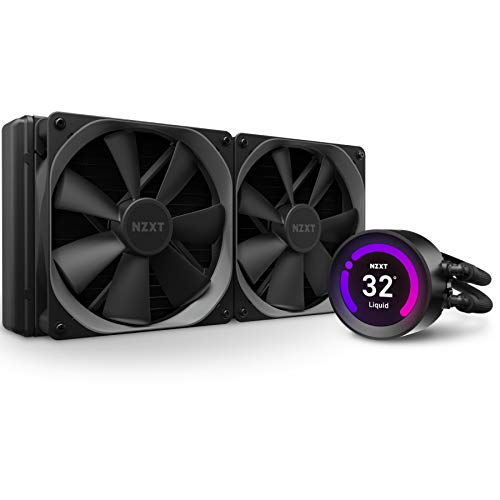
NZXT Kraken Z63 280mm – RL-KRZ63-01 – AIO RGB CPU Liquid Cooler – Customizable LCD Display – Improved Pump – Powered by CAM V4 – RGB Connector – AER P 140mm Radiator Fans (2 Included)
The all-new Kraken Z Series lets you personalize your all-in-one liquid cooler like never before Through CAM’s unique software interface you can do more than simply fine-tune settings you can now display your favorite images and animated gifs or CAM system information allowing for total customization Backed by a 6-year the Kraken Z series provides
The all-new Kraken Z Series lets you personalize your all-in-one liquid cooler like never before Through CAM’s unique software interface you can do more than simply fine-tune settings you can now display your favorite images and animated gifs or CAM system information allowing for total customization Backed by a 6-year the Kraken Z series provides superior performance in liquid cooling simple installation and a look that is uniquely your own
Product Features
- CUSTOMIZE YOUR BATTLESTATION: With a bright, 2.36″ LCD screen capable of displaying 24-bit color, you can now completely customize the look of your CPU cooler
- STAY IN CONTROL: CAM’s elegant, user-friendly software makes you the master of your PC with simple-to-use, intuitive controls, you can manage your Kraken’s performance and appearance with ease
- INCREDIBLE PERFORMANCE: Featuring a chamfered intake and fluid dynamic bearings, they deliver silent operation, long-term reliability, and powerful cooling performance
- SIMPLE INSTALLATION: With the fully programmable display, the pump can be rotated* to fit the needs of your motherboard without affecting the direction of the logo or image
- COMPATIBLE SOCKET & CPU: Intel Socket LGA 1151, 1150, 1155, 1156, 1366, 2011, 2011-3, 2066 / AMD Socket AM4, TR4(bracket not included)




















', 'https%3A%2F%2Ftimelessexchange.com%2Felectronics%2Fnzxt-kraken-z63-280mm-rl-krz63-01-aio-rgb-cpu-liquid-cooler-customizable-lcd-display-improved-pump-powered-by-cam-v4-rgb-connector-aer-p-140mm-radiator-fans-2-included'))
Don’t listen to the negative reviews I debated over this cooler for weeks because of the negative comments about CAM and the defective pump problems.After my internal struggle with what to get I finally said “why not” and wanted to take a leap of faith on this one.I’ve had it set up for the past 2 weeks now and haven’t had ONE single problem with CAM nor the cooler. The CAM issues are WIDELY over exaggerated, DO NOT LISTEN to these reviews, this is a very nice cooler! Keep in mind people tend to write reviews…
NZXT has a well earned reputation for its terrible CAM software and you need it to configure your Kraken. It performed better than the reviews led me to believe it would on noise, cooling capability with a 2700x CPU running 24×7 Folding @ home.Control the fans by connecting the to your motherboard headers. You want to use the CAM controlling software as little as possible. The current version when I assembled the machine was fine, caused no issue, and it obeyed my settings to not poll/monitor other hardware. In the two most recent revisions it attempts to read from my motherboard’s…
If it doesn’t work the first time, just try and try again. So after reading all the hype about how great the Kraken is, I decided to swap out my DeepCool Captain 240ex and see if this was any better. I went with the x62.2 version and mounted it into my NZXT S340 elite. Perfect match right? Well no, first problem: On the Asus Crosshair 6 Hero the ram is very close to the CPU socket. So I couldn’t mount the pump in the straight position. I had to angle it in such a way that now the logo was not centered. Oh well I guess, let’s see if it’s worth making my…