
Nikon D780 DSLR Camera 24.5MP CMOS Sensor with AF FX NIKKOR 50mm f/1.8D Lens, 2 Pack SanDisk 128GB Memory Card, Backpack, Full Size Tripod & A-Cell Accessory Bundle (Black)Nikon intl D850 DSLR Camera Body 45.7MP CMOS Sensor with SanDisk 32GB Memory Card, Gadget Bag, Tripod and A-Cell Accessory Bundle (Black)Nikon AF-S FX NIKKOR 24-70mm f/2.8E ED VR Zoom Lens with Auto Focus for Nikon DSLR Cameras w/ B+W 82mm Clear UV Haze with Multi-Resistant CoatingDJI Mavic 3 Cine Premium Combo - Camera Drone with 4/3 CMOS Hasselblad Camera, 5.1K Video, Omnidirectional Obstacle Sensing, 46-Min Flight, Apple ProRes 422 HQ, Max 15km Video TransmissionDJI Mavic 2 Enterprise Advanced - Compact Commercial Drone with Thermal and Zoom Dual-Camera, and Spotlight and Loudspeaker Attachments Built for Search & Rescue, Fire Fighting, Inspection, and MoreGRTVF Portable 4K Underwater Camera Drone, Super Long Battery Life 120 deg, Wide-Angle Motion, Dive 150 Meters, Maximum Speed 6.6ft / S VR Perspective, Underwater RobotCanon EF 70-200mm f2.8 L is III USM Telephoto Lens - WhiteCanon EF 400mm f/4 DO IS II USM LensNikon AF DX NIKKOR 10.5mm f/2.8G ED Fixed Zoom Fisheye Lens with Auto Focus for Nikon DSLR Cameras (Certified Refurbished)Nikon AF FX NIKKOR 180mm f/2.8D IF-ED prime telephoto Lens with Auto Focus for Nikon DSLR CamerasNikon 24mm f/1.8G AF-S ED NIKKOR Lens - Bundle with 72mm WA UV Filter, Cleaning Kit, Cap Leash, Mac Software PackageNIKON NIKKOR Z 24mm f/1.8 S Wide Angle Fast Prime Lens for Nikon Z Mirrorless CamerasNikon 20080 NIKKOR Z 24mm f/1.8 S Wide Angle Prime Lens for Z-Mount Mirrorless Camera - (Renewed)Nikon D5600 DSLR Camera 24.2MP with NIKKOR 18-55mm f/3.5-5.6G VR Lens SanDisk 32GB Memory Card, Hight Speed Reader + ZeeTech Accessory Bundle (Black)Canon RF 15-35mm F2.8 L IS USMNikon AF-S NIKKOR 180-400mm f/4E TC1.4 FL ED VR Lens - Bundle with LensAlign MkII Focus Calibration System, Cleaning Kit, Lens Wrap, Lens Pen Lens Cleaner, Capleash, PC Software PackageNikon D5 DSLR Camera (Body Only, Dual XQD Slots) + Nikon 50mm 1.8G AF-S Lens + Sony 64GB QXD Memory Card + GODOX TTL Speedlite + Flash Trigger Transmitter/Receiver Combo

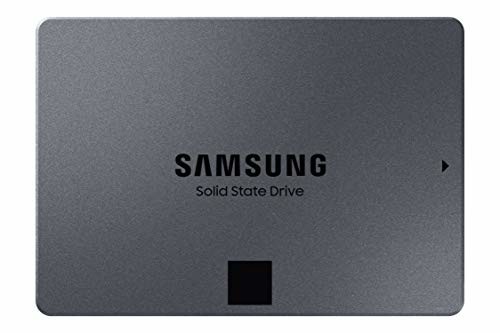
Samsung 860 QVO 2TB 2.5 Inch SATA III Internal SSD (MZ-76Q2T0B/AM), Gray

May 2, 2019 - Comment

Samsung 860 QVO 2TB 2.5 Inch SATA III Internal SSD (MZ-76Q2T0B/AM), Gray Step up to ssd-level performance. The 860 qvo gives you huge, terabyte storage and the incredible speed and reliability of an SSD. Product Features Latest 4-Bit MLC technology delivers fast read/write speeds of 550/520 MB/s Terabyte-level capacity eliminates the need for multiple storage


Samsung 860 QVO 2TB 2.5 Inch SATA III Internal SSD (MZ-76Q2T0B/AM), Gray

Step up to ssd-level performance. The 860 qvo gives you huge, terabyte storage and the incredible speed and reliability of an SSD.

Product Features

  • Latest 4-Bit MLC technology delivers fast read/write speeds of 550/520 MB/s
  • Terabyte-level capacity eliminates the need for multiple storage Solutions

  • V-nand reliability
  • This drive is compatible with PCs and laptops that accept 2.5″ 7mm SATA drives

Comments

Anonymous says:

Perfect 1TB drive… I’ve never had a 1TB ssd, although I’ve had 256gb and 512gb drives all of different makers, but I figured if I was going up to 1T I’d go Samsung.I cloned my 512gb Mushkin to the Samsung drive w/o a problem using Acronos True Image 2019 instead of the Samsung Magician software that you can download.Put the Samsung in as the boot drive to see if it would boot and the PC booted right up…I booted the drive several times to see if there were any problems but there were none.I then erased the 512gb drive and will use it as my second drive putting Linux 19.1 Mint on it giving me a dual boot system.I’m very, very pleased.

Anonymous says:

A troublesome installation. Hope to see good performance going forward. Since this SSD includes absolutely no installation instructions, outside of the most unhelpful diagram ever, if you just want an extra drive to run certain stuff more quickly one, rather than migrating data. Thankfully, I am a software engineer… which meant I had no idea what to do. So I contacted support. It’s 3 am, I didn’t expect much. Restarted a couple times. Tried rewiring the sata cables (which it didn’t come with, by the way…kinda inconvenient). Nothing.So, finally, about to give up I right clicked on “This PC” in File Explorer, hoping to find something of note. I found Manage. Navigated to Disk Management, and waited for a moment. Finally, it was shown that the new SSD was not formatted. Like literally at all. So I just did that, and now it shows up in file explorer. yay.After a few tests, it says that it’s downloading and moving files at around 1 MB/s, where the other components are now bottlenecking it. So…all in all…looks good for a hard…

Write a comment