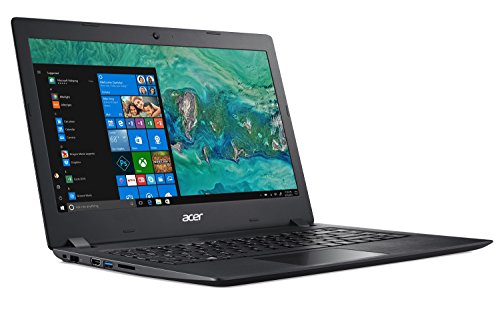
Acer Aspire 1 A114-32-C1YA, 14″ Full HD, Intel Celeron N4000, 4GB DDR4, 64GB eMMC, Office 365 Personal, Windows 10 Home in S mode
Acer Aspire 1 A114-32-C1YA comes with these high level specs: Intel Celeron N4000 Dual-Core Processor 1.1GHz with Intel Burst Technology, Windows 10 Home in S mode, Microsoft Office 365 Personal 1-Year Subscription, 14″ Full HD (1920 x 1080) widescreen LED-backlit display, Intel UHD Graphics 600, 4GB DDR4 SDRAM Onboard Memory, 64GB eMMC, Secure Digital (SD)
Acer Aspire 1 A114-32-C1YA comes with these high level specs: Intel Celeron N4000 Dual-Core Processor 1.1GHz with Intel Burst Technology, Windows 10 Home in S mode, Microsoft Office 365 Personal 1-Year Subscription, 14″ Full HD (1920 x 1080) widescreen LED-backlit display, Intel UHD Graphics 600, 4GB DDR4 SDRAM Onboard Memory, 64GB eMMC, Secure Digital (SD) card reader, High-Definition Audio Support, Two Built-in Stereo Speakers, 802.11ac WiFi (Dual-Band 2.4GHz and 5GHz), Bluetooth 4.1, 10/100/1000 Gigabit Ethernet LAN (RJ-45 port), Webcam (640 x 480), 1 – USB 3.0 port, 2 – USB 2.0 ports, 1 – HDMI out with HDCP support, 1 – Ethernet (RJ-45) Port, 2-cell Li-Ion Battery (4810 mAh), Up to 6.5-hours Battery Life, 3.64 lbs. | 1.65 kg (system unit only) (NX.GVZAA.003). Do not expose the computer to direct sunlight.Do not place it near sources of heat, such as a radiator
Product Features
- Intel Celeron N4000 Dual-Core Processor
- 14″ Full HD (1920 x 1080) Widescreen LED-backlit Display
- 4GB DDR4 SDRAM Onboard Memory & 64GB eMMC
- Microsoft Office 365 Personal 1-Year Subscription & Windows 10 Home in S mode
- Up to 6.5 Hours Battery Life

















)
Excellent value for a $249 laptop, compares nicely to HP Stream 14 Length:: 13:00 Mins Video review posting soon!I review a lot of laptops at or around the $200 price point and it’s nice to see how far things have come. This is a solid offering from Acer that lines up nicely with a similar laptop from HP (The Stream 14) with the same basic internal configuration (N4000 dual core Intel processor, 4GB of RAM, and 64GB of storage).The Acer’s advantages here is that it has a 1080p display vs. a 720p on the Stream 14. It also has a built-in hard wired ethernet port for connecting up to the network. But the Stream has better battery life.Performance is solid for basic tasks like web browsing, email, Word, Excel, etc. It has a nice snappy feel to it. Games are not so great given the lower end fanless processor inside. So things like Fortnite and other recent games will be too slow to enjoy on this device.For those looking to run Linux I found the compatibility here to be better than…
A very solid laptop for the price. This laptop is a great buy that fits nicely between “cheap” and “too cheap”. You’re obviously not going to be playing graphics intensive games on this. That’s not what it’s for. If you’re looking for a solid internet/email/office apps laptop that is light weight, has decent battery life, is surprisingly speedy, and is cheap, this is it.I personally use mine for programming classes and meetups. It runs Visual Studio Code with a dozen Chrome pages and LibreOffice open no problem. If you want to watch some YouTube or Netflix, it does that nicely too. I’ve never noticed any video lags or stuttering. Most apps open up in about 5 to 7 seconds. Chrome opens in less than 5 usually. I also have Linux (Ubuntu 18) running in dual boot. The only problem I have faced with running Linux is that you have to put the touch pad into Basic mode in the BIOS before using Linux as it doesn’t support the touch pad in Advanced mode. Advanced mode allows the touch pad to use advanced gestures like…
Great little computer for the price!! I haven’t owned a new laptop since I bought my Asus 6 years ago. I am comparing this little gem with that monster. This is smaller and lighter. The battery life so far much surpasses what I was used to. This Acer has a much more user-friendly keypad and touchpad, and the display and sound are much improved as well. The internet speed is faster and the response to new tasks is quick. The set-up was pretty easy. Nice to have Office included for the first year, therefore saving $60+ out of the gate. I was used to Windows 10 and the s mode does not seem to be a problem as I just use Edge to access what I need without downloading the apps, ie google photos, etc. I did not need anything with bells and whistles and therefore did not want to spend a lot of money – just something better for word processing, social media, emailing, etc. That is exactly what I found.