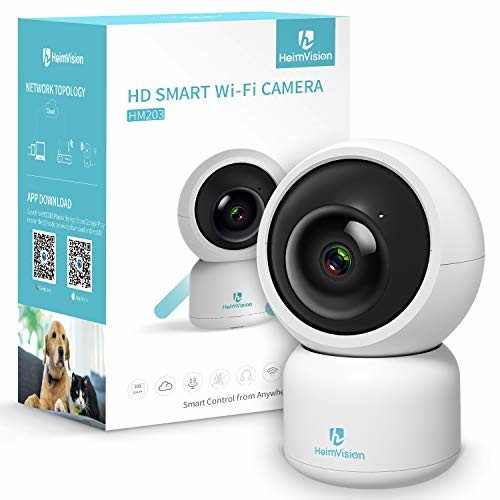
heimvision HM203 1080P Security Camera with Smart Night Vision/Ptz/Two-Way Audio, 2.4GHz Wireless Home Surveillance IP Camera for Baby/Elder/Pet/Nanny Monitor, Cloud Service/Microsd Support
Specification: Image resolution: 1080P Micro SD Storage: up to 128gb lens: F2.3mm dfov 110° pan: 355° tilt: 55° digital zoom: 4x IR distance: 15M/ 49 feet power: dc5v-1.5A connection: Wi-Fi features: night vision, 2-way audio, motion detection and notification, auto tracking, cloud service What’s in the box: heimvision Smart IP camera x1 power cable x1
Specification: Image resolution: 1080P Micro SD Storage: up to 128gb lens: F2.3mm dfov 110° pan: 355° tilt: 55° digital zoom: 4x IR distance: 15M/ 49 feet power: dc5v-1.5A connection: Wi-Fi features: night vision, 2-way audio, motion detection and notification, auto tracking, cloud service What’s in the box: heimvision Smart IP camera x1 power cable x1 screw set x1 base tray x1 manual x1 warranty card x1
Product Features
- 1080P HD video live stream to your smartphone day and night. Install the app, connect, and you will have control of the camera by your mobile phone. Control the camera pan/ tilt/ zoom for a 360 Degree view with the 110 Degree wide angle lens. Check what your pet, kid, baby or elder is doing or check in what’s going on in your home, company, shop, etc. At anytime and anywhere
- Security camera with motion and sound detection. The HM203 Wi-Fi camera detects movement and sound, records and sends notifications to you. You will receive real-time activity alerts while you’re out. Preset your desired positions, and you can view your desired position By one touch. Or you can have the camera auto tracking and get a full horizontal view of your home, company, shop, etc. On the mobile phone
- Smart camera with night vision and two way audio. Automatically switches to night vision mode in low light when night falls. Night vision ranges up to 49 feet. Equipped with built-in microphone and speaker, remotely talk and listen to is enabled. Use it as your baby monitor and you can keep an eye on your kids from anywhere, at any time. You can remotely view your pet dog, family, employee, etc. And talk to them
- Reliable Wi-Fi camera with user-friendly app: only supports 2.4GHz Wi-Fi to connect via mobile App YCC365 Plus (iOS/Android) for an easy and quick setup. Ap hotspot/ LAN connections are also supported. In the app, you can customize the settings such as camera sharing, motion detection and notification, preset, auto tracking, image rollover etc.
- Cloud Storage and local backup: The heimvision HM203 comes with a 1-month AWS cloud of 72 hours storage (with no charge) recording to avoid risk of losing footage from a microSD memory card, and ensures all recorded video is safe, secure, and protected with the most efficient compression and highest protection of data. Local backup supports up to 128 GB microSD card. You can review, save, playback and share footage at any time.

















)
Even better than my previous one from them that I Loved!!
Customer Video Review Length:: 1:07 Mins I previously bought, and still actively use, the HM202 from Heimvision. Until I turned this HM203 on I thought the picture could get no clearer, the night vision was best i have ever seen under $1,000x and the movement was super fluid. This version has all those features except beefed up to a whole other level. The night vision is crystal clear, the 2 way speaker can pick up a pin drop, and the motion activated camera follows so much better and smoother to the slightest movement. If your in the market for a ânannyâ cam, home security cam, or whateverYou will not be disappointed with either model I mentioned but If you ask me the best one is this new HM203Updated 3/19/19. Wanted to post some shots of it turned on and working. Look at how clear that pic of my little pup is. You should see how many pics of Gracie we have since we put it in so we moved it a little higher lol
easy to use The camera arrived in a simple, small box, with key technical features printed. Inside the box, thereâre a camera, a power cable and adapter, a bracket and a set of screws for wall mounting, and a quick guide. I followed the instructions on the quick guide. First, download the mobile App. It was easy and installed without any problems. Next, create an account. Signed up with an email and create a password. So far, so good. Then I plugged in the camera. After about 30s, the camera emitted a voice that âPlease configure camera by scanning code or AP hotspot.ââ Then I started to add the camera on the App. Several minutes later, I was able to get the camera view on my mobile. Tips for adding the camera successfully: 1. Make sure that connecting the 2.4Ghz WiFi. 2. Make sure that camera and router are near with each other. 3. Align the QR code to camera lens. 4. Make sure to peel off the protective film on the camera so that you can get a clear view. It is an indoor camera. I installed it…
easy to set up
Customer Video Review Length:: 1:02 Mins Loved this product! It was so easy to set up. I just need to use the camera to scan the qr code on my phone and it got connected right away. The camera quality was super good as well. Now I can watch my cats event when I’m on a business trip or far away from home!